FlockSync

Sign in to your church

Every church has its own FlockSync address. Type yours and we'll take you to its sign-in page.

Letters, numbers and dashes, ending in .flocksync.app

Don't know your address? Ask your church office, or email info@flocksync.app.

Get started

All-in-oneChurch management for every ministry

Every ministry.
One place.

FlockSync brings your people, services, volunteers, guests, events, website, giving and books, and even your building, into one simple app your whole team can use. Stop juggling ten tools. Start shepherding.

  • Free for church plants
  • A guide on every screen
  • Your church's own address
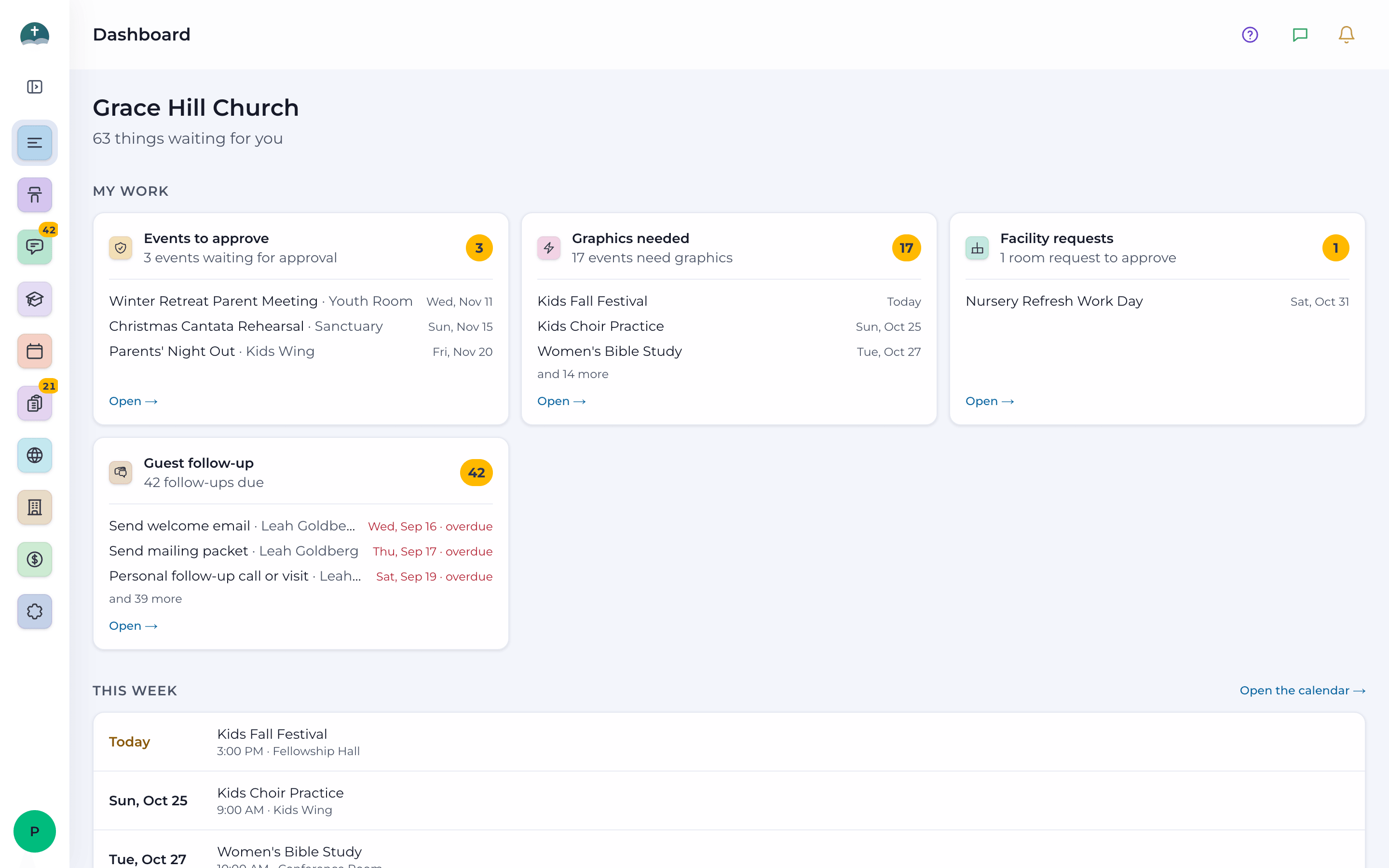
The FlockSync Dashboard: cards for the work waiting on you, this week's approved events and quick links to the pages you use most.
  • 8ministry areas in one app
  • 30+modules, each with its own guide
  • 12connections to tools churches use
  • 1sign-in for your whole team

Sound familiar?

Most churches run on eight to ten tools that don't talk to each other.

A membership database here, a planning app there, a giving platform, accounting software, a website builder, a signage player, a form builder, a thermostat portal. Each one has its own login, its own bill, and its own copy of your people.

FlockSync replaces the patchwork with one connected app, built around how a church actually runs, so your staff spend less time copying information between systems and more time with people.

Before
  • Membership database
  • Worship planning app
  • Volunteer scheduler
  • Attendance spreadsheet
  • Group texting service
  • Event registration site
  • Room booking calendar
  • Giving platform
  • Accounting software
  • Website builder
  • Signage player
  • Form builder
  • Thermostat portal
  • Door access portal

Separate logins, separate bills, separate copies of your people.

FlockSyncAfter
  • One sign-in
  • One record per person
  • One church calendar
  • One set of books
  • One place for guests
  • One app to learn
  • Before: Typing the same event into the calendar, the website, the bulletin and the lobby screens.

    With FlockSync: Enter it once. It reaches the calendar, website, screens and newsletter.

  • Before: Begging for volunteers in group texts and spreadsheets.

    With FlockSync: Auto-schedule, Accept and Decline links, and a My Schedule page for every volunteer.

  • Before: Visitor cards in a drawer, and guests who never hear back.

    With FlockSync: Every guest gets a checklist, a mentor and a team member reminded to follow up.

  • Before: Giving in one system, the books in another, the budget in a spreadsheet.

    With FlockSync: Gifts, deposits, bills, budgets and board reports in one set of fund-accounting books.

  • Before: One shared login, so volunteers can see everything.

    With FlockSync: Access groups give each person exactly the pages they need.

  • Before: Someone driving in early to turn on the heat and unlock the doors.

    With FlockSync: Thermostat schedules and door schedules that run on their own.

Connected by design

Enter it once. It shows up everywhere.

Because every ministry lives in the same app, information flows on its own: from Sunday's attendance to Monday's follow-up, from a department's idea to the lobby screens.

A guest's first Sunday

From a visitor card to a church family.

  1. AttendanceA visitor card

    A counter adds the guest while taking attendance, or they fill in a card on your website.

  2. People requestsReviewed and welcomed

    Someone checks the details, and the guest is added to People.

  3. GuestFollow-up begins

    A thank-you text, a pastor's call and a welcome email, each with a due date and an owner.

  4. DiscipleshipA next step

    A mentor and an invitation to a next step, like the discipleship class, with reminders before every lesson.

  5. Member CareNever forgotten

    If a member starts missing services, the pastor's team is asked to reach out.
One event, everywhere

Submitted once by the department. Seen everywhere it should be.

  1. Department EventsSubmitted once

    With rooms, graphics and reminder texts requested on the same form.

  2. RequestsApproved

    The approver says yes, the room is reserved, and Promotions gets a graphics task.

  3. Calendar & websitePublished

    On the church calendar, the public calendar and your website's events.

  4. SignageOn the screens

    An announcement slide appears on the lobby screens, made for you.

  5. Newsletter & PublicationIn print

    It fills into the monthly newsletter, the events flyer and the yearly calendar.

The tour

Everything your church does, in one app.

Eight areas, from Sunday planning to the church books to the thermostat in the fellowship hall. Click any screenshot to see it full size.

Church Management

Know your people. Plan your Sundays.

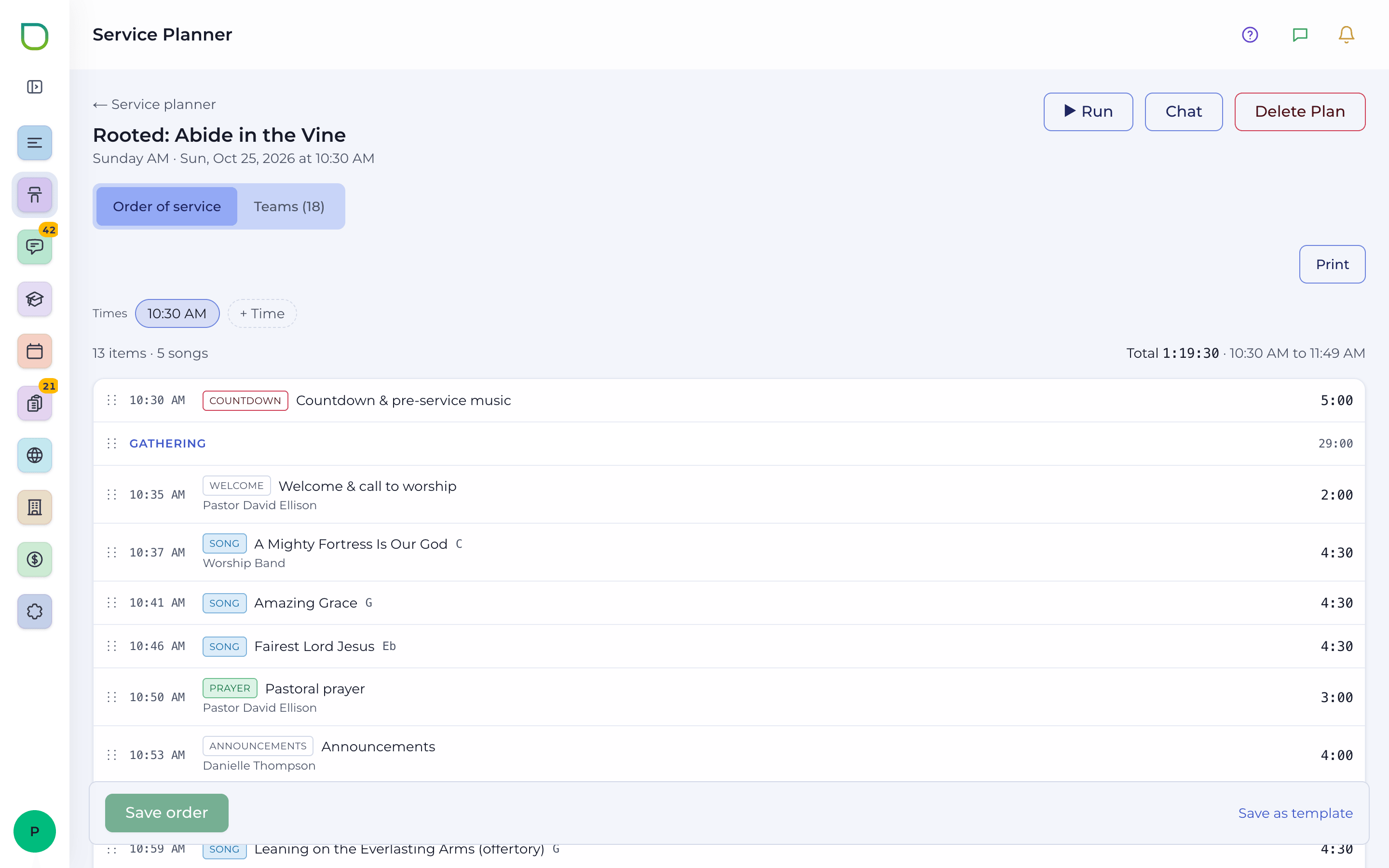
A clean, searchable record for every person and group, and a service planner your worship team will actually enjoy: the order of service, the songs, and the volunteers, all on one plan.

Why it mattersYour worship leader, tech team and volunteers all look at the same plan, and nobody has to send twenty texts to fill the sound booth.

Church Management: training video

  • People

    One record for every person in your church.

    • Search, filter, sort and choose the columns you want to see
    • Details, groups, people category and status on every person
    • Pictures you can frame, clean up, and update for everyone at once
    • Spot people entered twice and merge them, keeping what's right
    • Each person's giving and attendance history, one click away
    • Keeps in step with Elvanto if that's where your people live today
  • Groups

    Small groups, teams and classes, organized.

    • Name, color, type, leader, meeting time and place for each group
    • Text or email a whole group from Communications
    • Archive groups that have finished and bring them back any time
  • Service Planner

    Plan every service from order to Amen.

    • One plan per service date, or a whole month of plans at once
    • Order of service with times, lengths, leaders, notes, production cues and files
    • Templates with items that only appear on certain weeks of the month
    • Start from last week, and see every change in the plan's history
    • The Matrix: several weeks of a service side by side
    • Run mode to follow the order live, plus printed agendas and people lists
  • Songs & CCLI

    A song library built for worship teams.

    • Keys, arrangements, chord charts in any key and capo, words-only and print
    • Practice tracks and files with every song
    • Bring your library over from Planning Center Services
    • Last used and most used, so the same few songs aren't over-sung
    • A CCLI report for any range of dates, with public-domain songs left out
  • Volunteer scheduling

    Fill every position without the group-text chaos.

    • Teams and positions with how many each needs and who's approved to serve
    • Preferences and away dates, so you only ask people who can come
    • Auto-schedule fills open spots from each team's roster
    • Requests by text and email with Accept and Decline, and reminders before they serve
    • Every volunteer gets a My Schedule page; no account needed
    • Chat with a plan's teams, and volunteers can reply right from their link
  • Reports & Internal Forms

    Rosters on paper, and the forms your staff use.

    • People Report: choose who's in the roster, then download or email a PDF
    • Service Planner reports on volunteers, songs, teams and timing, with CSV export
    • Internal Forms (Enterprise): staff fill in and email forms, and a password-protected forms page for your website

Connect

Nobody slips through the cracks.

Attendance, guest follow-up and member care work as one: a visitor card filled in on Sunday becomes a checklist for your team on Monday, and a member who's been missing gets a call from the pastor.

Why it mattersGuests are most likely to come back when someone reaches out within a day or two. FlockSync makes sure someone does, and tells you who.

Connect: training video

  • Attendance

    Count every service by name, from a phone.

    • Counters mark people present by name, department by department
    • Several counters work the same service at once
    • Adults, children and the total worked out for you
    • Add a visitor on a visitor card while you count
    • The Tracker shows every service with totals by day and department
    • Send the pastor an attendance report for the services you choose
  • Guest follow-up

    A checklist for every first-time guest.

    • Thank-you text, pastor's call, welcome email, mailing packet, a personal visit, a next step and a mentor
    • Each step opens when the one before it is done, with its own due date
    • Assign steps to staff, who get texts and emails when theirs are due
    • Send the thank-you text and welcome email from the guest's page
    • Returning guests come back into follow-up on their own
  • Member Care Enterprise

    Notice who's been missing, and reach out.

    • Every day, members who missed 3 or more main services in the last 2 weeks are added (away dates excused)
    • You see exactly which services they missed
    • Care tasks starting with a call from the pastor, with reminders to whoever has them
    • Resolved on their own when attendance picks back up
  • Communications

    Texts and email, in one place.

    • Message whole groups, or pick people one by one
    • Replies to your church's texting number land in the Inbox
    • A queue of reminder messages scheduled from department events
    • A history of every text and email sent, from every screen
  • Newsletter

    A printed monthly newsletter, designed in the browser.

    • A front-and-back 8.5 × 11 designer: text, fonts, pictures, shapes and backgrounds
    • The month's approved events fill in on their own
    • Ready-made designs, or copy last month's
    • Spelling and grammar check, then print, PDF, publish to the website or email it
  • Connect Reports

    See growth, and see who needs care.

    • Attendance trends with charts, and guest return rate
    • Member attendance, and absent members grouped for pastoral care
    • Download or email any report as a PDF

Discipleship

From the first lesson to graduation day.

Run an eleven-lesson foundations course three times a year. Enroll students, track every lesson, keep them encouraged with reminders, and hand graduates a certificate worth framing.

Why it mattersNew believers need a clear next step. Discipleship gives them one, and gives your teachers everything they need to walk with them.

Discipleship: training video

  • Classes & enrollment

    Plan the year's classes and fill them.

    • Three classes a year (Winter, Spring and Summer), eleven weekly lessons each
    • Lesson dates you can move when the calendar changes
    • Enroll from People, add by hand, or let students sign up online from the class page
    • A class flyer and a welcome sheet for each student
  • Progress & reminders

    Every lesson tracked, every student encouraged.

    • A progress grid: present, made up or absent, and whether the handout was done
    • Mark a whole lesson present in one step
    • Welcome emails and texts when students enroll
    • Automatic reminders the day before each class
  • Curriculum & certificates

    Beautiful printables with your church's name and logo.

    • The teacher's manual, student workbook and single-lesson handouts
    • Diploma-style certificates with a seal, certificate number and two signature lines
    • Your own program name, certificate title and signatures

Events & Calendar

One calendar. Every department. No double-booked rooms.

Ministries submit events, approvers say yes, and the event appears everywhere it should: the calendar, the website, the screens and the newsletter. Rooms, promotion and reminders are requested in the same step.

Why it mattersEnter an event once. FlockSync carries it to every place your church needs to see it, and keeps two groups out of the same room.

Events & Calendar: training video

  • Department Events

    Every ministry's events, in one place.

    • One-time, multi-day, weekly, monthly, certain weeks of the month, or a run of dates
    • Reserve rooms, ask Promotions for graphics and queue reminder texts from the same form
    • A public calendar switch for events the community should see
    • Approval first, so the calendar only shows what's official
  • Calendar

    The whole church's month at a glance.

    • Filter by department, read each day, and see what's coming up next
    • Subscribe in Apple Calendar, Google Calendar or Outlook
    • A public calendar for your website
  • Requests & approvals Enterprise

    Clear approvals for events, people and promotion.

    • Approve, reject or fix events before they go on the calendar
    • Approve next year's events ahead of time, then publish the whole year at once
    • New people from visitor cards are reviewed before they join People
    • Promotions gets a graphics task for each event, with a daily reminder
  • Facilities Enterprise

    Room booking that prevents double-booking.

    • Request one room or several for a date and time
    • An hour-by-hour schedule of every room, with open hours you can book
    • Approvers approve, reject or adjust requests
    • A room that's reserved or waiting for approval can't be booked twice
  • Registration Enterprise

    Sign-ups, tickets and check-in for any event.

    • In person or online, on one date, several dates or timed entry slots
    • Ticket types, add-ons, gifts, promo codes, reserved seating and a waitlist
    • Online payment through Stripe (card, Apple Pay, Google Pay) or pay at the door
    • Tickets by email with a QR code and Add to Apple Wallet
    • Check people in at the door on phones, and sell at the door too
    • Tracked share links, a QR code, website embed code and detailed reports
  • Events Reports

    How busy is the church, really?

    • Event volume by month and department, and calendar coverage
    • Room usage, busiest times, and approval turnaround
    • Promotion lead time, and registration sign-ups, check-ins and revenue

Website & Signage

Your front door, always up to date.

Build your church website from about sixty designs, put your announcements on the screens in the lobby, and print a monthly flyer or a yearly wall calendar. They all draw from the same events and service times.

Why it mattersChange your service times once, and the website, the screens and the printouts follow. No more stale Easter banner in July.

Website & Signage: training video

  • Website

    A church website you can change yourself.

    • About sixty designs, with your own colors and fonts
    • Build every page from sections, and arrange the menu
    • Service times, dated announcement banners, Plan a Visit, Give and Watch pages
    • A page for every ministry
    • Events and newsletters fill in on their own
    • Visitor statistics: how many came, when, and what they read
  • Signage Enterprise

    The screens around your building, on autopilot.

    • An announcement slide for every upcoming public event, made for you
    • An upcoming-events slide, and service times last
    • Your own full-screen videos and images, with start and stop dates
    • Always matches the website
    • FlockSync Player for Linux and Android: up to 10 screens and a stage mic board, with feeds
  • Publication

    Printed pieces, ready to go.

    • A monthly upcoming-events flyer in that month's seasonal design
    • A 13-page yearly wall calendar
    • Every published newsletter in one place

Financial

Church books your treasurer will love.

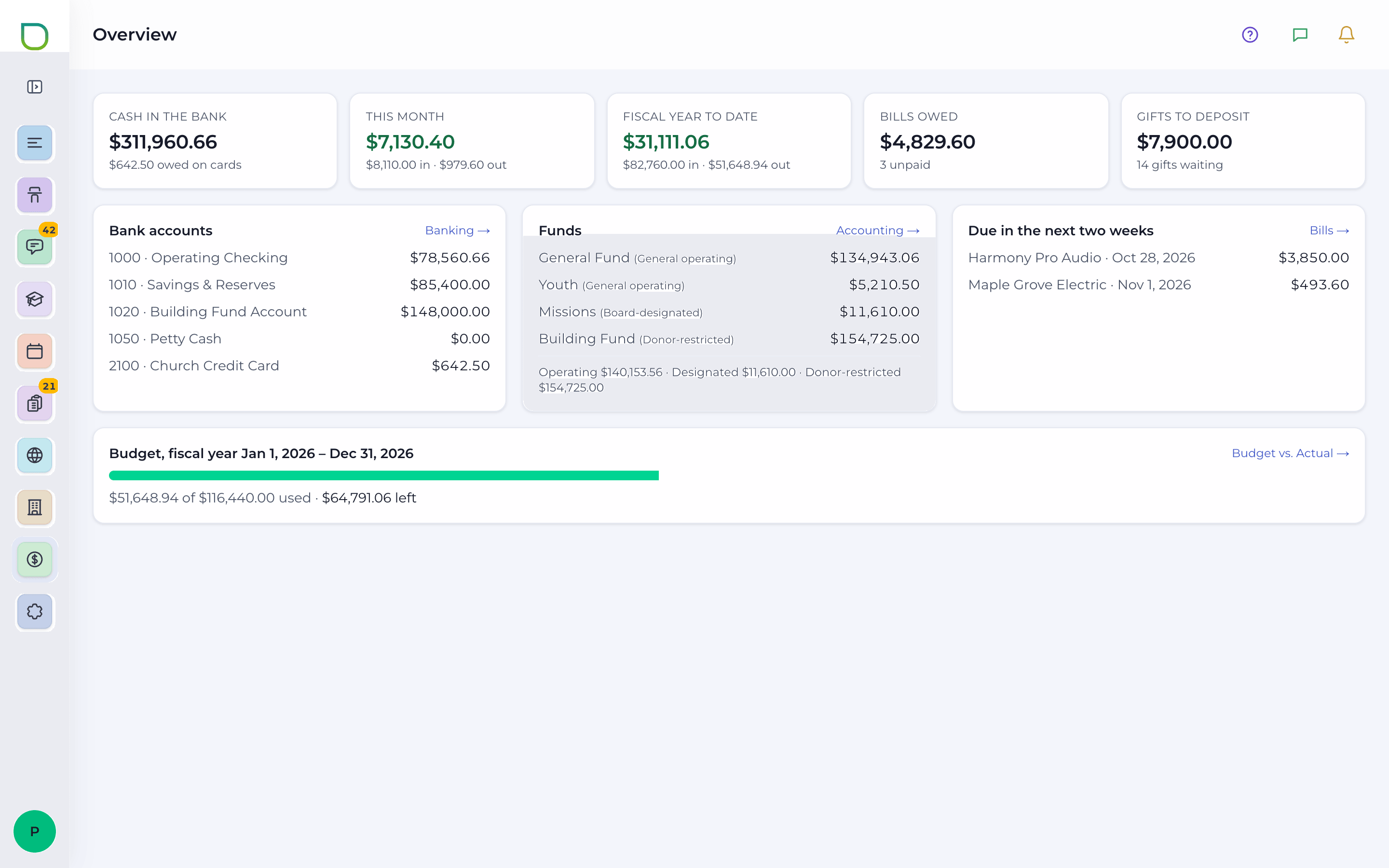
Real fund accounting built for churches: giving by fund, deposits, bills, banking and reconciliation, budgets, payroll and approvals, with the reports your board actually asks for. Or connect QuickBooks Online on Enterprise.

Why it mattersRestricted gifts stay restricted, every change leaves a trail, and the Pastor's Monthly Report is one click away.

Financial: training video

  • Giving & payments

    Every gift, in the right fund.

    • Record gifts by fund and link them to people
    • Enter a Sunday's gifts as one batch
    • Year-end giving statements
    • Every payment taken through Registration, online or at the door
    • Deposits with processing fees, and Stripe payouts
  • Bills & banking

    Money in and out, reconciled.

    • Bills split across accounts and funds, vendors, and recurring contracts with renewal reminders
    • Bank accounts, cash and cards, with transfers between them
    • Reconcile each statement, import it, lock it, and have a second person review
    • Reimbursements with the receipt attached
    • Payroll runs recorded as one entry, housing allowance included
  • Controls you can trust

    Good stewardship, built in.

    • Approvals for bills, journal entries and fund transfers, with tiers by amount
    • Named approvers and separate duties
    • Posted entries are reversed, never changed or deleted
    • A full audit trail, and documents kept in private storage
  • Budgets, planning & reports

    Answers for the board meeting.

    • Budgets by department, started from last year
    • Capital projects with change orders, and a cash-flow forecast with three scenarios
    • Statement of Activities and Statement of Financial Position, with and without donor restrictions
    • Giving, donors, cash flow, spending and budget by month
    • The Pastor's Monthly Report and a board packet

Building

Your building, on a schedule.

Connect your Pelican thermostats and ProdataKey doors, and run the building from the same place you plan the week. Rooms warm up before people arrive and doors unlock when they should.

Why it mattersComfortable rooms, lower energy bills, and no one driving in at 6 AM to unlock a door. All Enterprise.

Building: training video

  • Environmental Enterprise

    Every thermostat, from one screen.

    • Each room's temperature, mode, fan, keypad lock and schedule
    • Weekly schedules so rooms are ready when people arrive
    • All Off, Default ON for a whole group, and a daily shut-off
  • Automations Enterprise

    Set it once for the whole building.

    • One weekly schedule for a whole group of thermostats
    • Event schedules that take over, then hand back
    • Let the weather choose heat or cool for an event
    • Lock every keypad on a timer
  • Access Control Enterprise

    Doors that open for the right people.

    • Live status for every door: unlock, hold open or close
    • Fobs, cards, phone and PIN for each person, with dates and groups
    • Door schedules that unlock for everyone at set times
    • Who went where, and an Emergency action for every door at once

Administration

The right access for every person.

Give each staff member and volunteer exactly what they need, connect the services you already use, and keep a record of everything. Every module has a detailed guide one tap away.

Why it mattersYour children's director doesn't need the payroll screen. Access groups make that a two-minute decision, not a worry.

Administration: training video

  • Users & access groups

    Down-to-the-page permissions.

    • Roles: Site Admin, Admin, Department Head and Standard
    • Access groups with None, View, Edit or Access for every page, plus extra abilities
    • Each person's own theme, layout and dashboard quick links
  • Integrations

    Connect what you already use.

    • Elvanto, Twilio texting, email, Stripe, Apple Wallet and Planning Center
    • Enterprise adds Pelican, ProdataKey, YouTube, Dropbox, QuickBooks Online and signage links
    • A setup checklist and a Test Connection button on every connection
    • Keys and passwords are stored encrypted and never shown again
  • Church setup

    Your church, described once.

    • Church profile, logos and pastor information
    • Departments, services and rooms used across every module
  • Logs, reports & backups

    A record of everything, and a way back.

    • An audit log of who did what and when, and a log for each connected system
    • Administration reports as PDFs to download or email
    • Automatic backups every night or week, and restore in a few clicks

The little things

Thoughtful details that make Sunday easier.

The features people notice first, and the ones they can't live without later.

  • A user guide on every screen

    Press the ? in the header on any page for a detailed, searchable guide to that module, written in plain English: from taking attendance to reconciling a bank statement. New staff and volunteers train themselves.

  • CCLI reporting, done

    Every song used in a date range, ready to report, with public-domain hymns left out.

  • No account needed to serve

    Volunteers accept, decline, add away dates and chat with their team from their own My Schedule link.

  • Tickets in Apple Wallet

    Every registration ticket has a QR code and an Add to Apple Wallet button, and check-in at the door works on phones.

  • Certificates worth framing

    Diploma-style discipleship certificates with your church's name, a seal, a certificate number and signatures.

  • Reports in every area

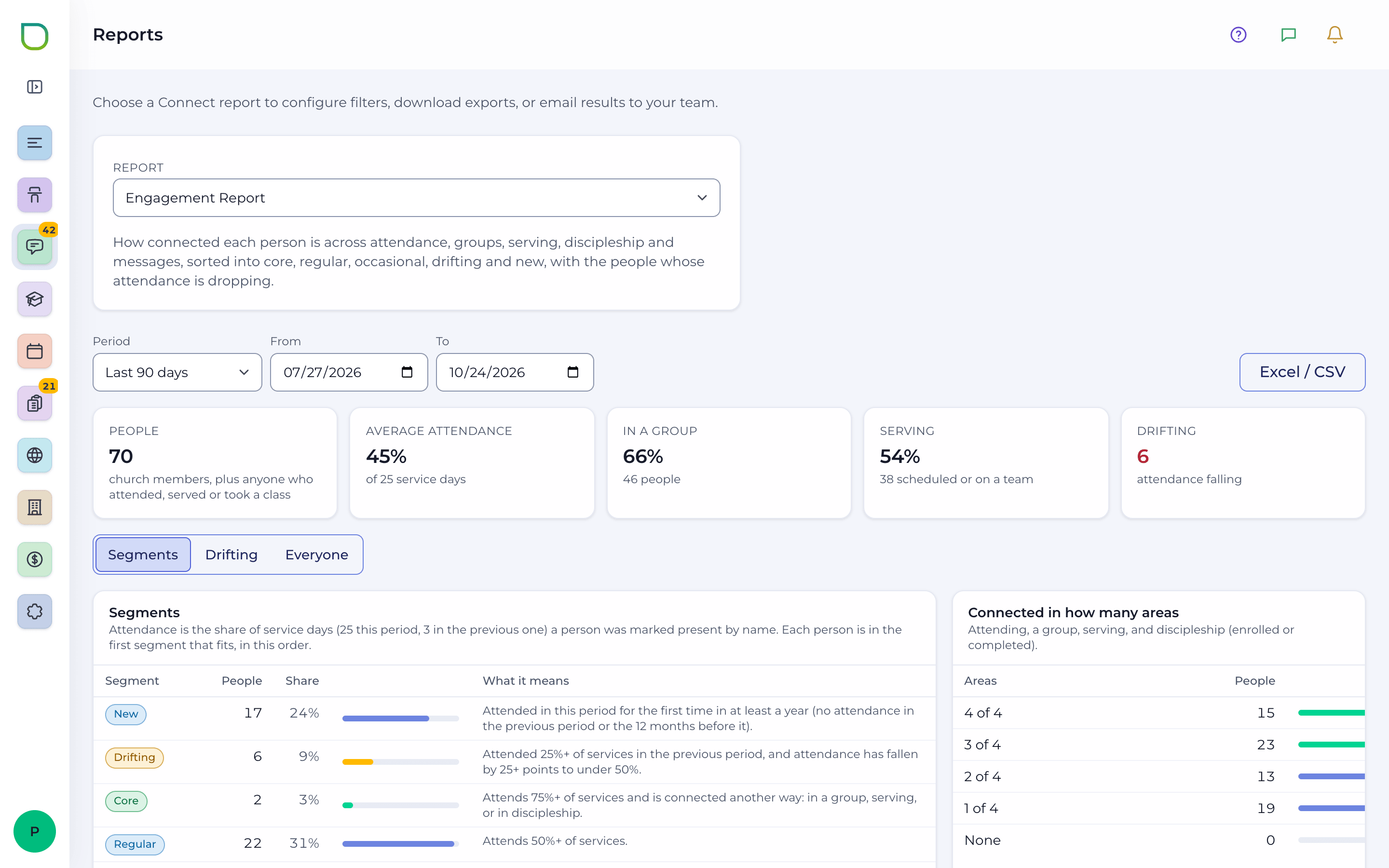
    Attendance trends, guest return rates, volunteer and song reports, event and room usage, registration revenue and full financial statements. Download a PDF or CSV, or email it to your team.

    A FlockSync reports screen with charts, filters and options to download or email a PDF.
  • A bell and a chat

    Notifications for what needs you, and conversations with your teams and people, at the top of every page.

  • Publish a whole year

    Approve next year's events ahead of time, then release them to the public all at once.

  • History is never erased

    Posted financial entries are reversed, never edited or deleted, so your books always tell the truth.

  • Reminders that send themselves

    Guest steps, care tasks, volunteer requests, class reminders and event emails go out on schedule.

Getting started

Up and running in four simple steps.

No software to install. FlockSync runs in the browser on computers, tablets and phones.

  1. Say hello

    Email us a little about your church and which plan fits. Church plants, ask about the free plan.

  2. Get your own address

    Your church gets its own FlockSync address, like yourchurch.flocksync.app, with its own private database.

  3. Bring your people

    Sync people and groups from Elvanto, import songs from Planning Center, or start fresh. Set up departments, services and rooms once.

  4. Invite your team

    Add accounts, choose each person's access groups, and let the built-in guides do the training.

Already on FlockSync? Sign in at yourchurch.flocksync.app

Sign in to your church

Every church has its own FlockSync address. Type yours and we'll take you to its sign-in page.

Letters, numbers and dashes, ending in .flocksync.app

Don't know your address? Ask your church office, or email info@flocksync.app.

Security & reliability

Your church's information, protected.

Churches hold sensitive things: giving records, children's details, pastoral notes. FlockSync is built to keep them private, and to keep a copy safe.

  • Your church's own database

    Each church's information lives in its own database at its own address. Nothing is mixed with another church's data.

  • Encrypted connection keys

    Keys and passwords for Stripe, Twilio, QuickBooks and every other connection are encrypted at rest (AES-256-GCM) and never shown again.

  • Strong sign-in

    Passwords are stored as strong one-way hashes, sign-in attempts are rate-limited, and changing a password signs out old sessions.

  • Automatic backups

    Backups every night or every week, kept in private storage, plus back up any time and restore in a few clicks.

  • Access you control

    Roles and access groups decide who can see, edit or approve each page, from attendance to payroll.

  • A record of everything

    An audit log of who did what and when, logs for every connected system, and a full audit trail in the books.

  • Same-origin checks on every change
  • Staff pages can't be framed by other sites
  • Rate limits on public sign-ups and forms
  • Finance documents in private storage

Pricing

Simple pricing. Every ministry included.

Three plans, priced per church in US dollars per month. Church plants start free.

  • Church Plant

    Free

    For qualifying church plants

    For church plants — email us to qualify.

    Ask about Church Plant

    Everything a new church needs to start strong:

    • People, groups and the Service Planner with songs, CCLI and volunteer scheduling
    • Attendance, guest follow-up, texts, email and newsletters
    • Discipleship classes and certificates
    • Department events and the church calendar
    • Your church website and printed publications
    • Full fund accounting: giving, bills, banking, budgets, payroll and reports
    • Users, access groups, logs and automatic backups
  • Basic

    $50/month (US dollars)

    Per church, per month, in US dollars

    The same features as Church Plant, for established churches.

    Get started on Basic

    Everything in Church Plant, including:

    • Every Church Management, Connect and Discipleship module listed below
    • Events, calendar and events reports
    • Website and publications
    • Every Financial tab, from Overview to Reports
    • Elvanto, Twilio, email, Stripe, Apple Wallet and Planning Center connections
    • Built-in user guides on every screen
  • Most complete

    Enterprise

    $100/month (US dollars)

    Per church, per month, in US dollars

    Everything FlockSync does, for churches running every ministry on it.

    Book an Enterprise demo

    Everything in Basic, plus:

    • Registration with tickets, Stripe payments, Apple Wallet and check-in
    • Member Care for members who've been missing
    • Requests: event approvals, people requests, facilities and promotions
    • Signage for the screens around your building
    • Internal Forms
    • Building: Pelican thermostats, automations and ProdataKey doors
    • QuickBooks Online, YouTube, Dropbox, Pelican, PDK and signage connections

Compare every feature

  • Included
  • Not included
Features included in the Church Plant, Basic and Enterprise plans
FeatureChurch PlantFreeBasic$50 per monthEnterprise$100 per month
Dashboard
DashboardMy work, this week, quick links, notifications and chatIncludedIncludedIncluded
Church Management
PeopleIncludedIncludedIncluded
GroupsIncludedIncludedIncluded
Service PlannerPlans, songs, CCLI report, teams and schedulingIncludedIncludedIncluded
ReportsIncludedIncludedIncluded
Internal Forms EnterpriseNot includedNot includedIncluded
Connect
AttendanceIncludedIncludedIncluded
Guest follow-upIncludedIncludedIncluded
Member Care EnterpriseNot includedNot includedIncluded
CommunicationsIncludedIncludedIncluded
NewsletterIncludedIncludedIncluded
ReportsIncludedIncludedIncluded
Discipleship
DiscipleshipClasses, progress, reminders, curriculum and certificatesIncludedIncludedIncluded
Events & Calendar
Department EventsIncludedIncludedIncluded
CalendarIncludedIncludedIncluded
Registration EnterpriseNot includedNot includedIncluded
ReportsIncludedIncludedIncluded
Requests
Event approvals EnterpriseNot includedNot includedIncluded
People requests EnterpriseNot includedNot includedIncluded
Facilities EnterpriseRequests, schedule and approvalsNot includedNot includedIncluded
Promotions EnterpriseNot includedNot includedIncluded
Public
WebsiteIncludedIncludedIncluded
Internal Forms setup EnterpriseNot includedNot includedIncluded
Signage EnterpriseNot includedNot includedIncluded
PublicationIncludedIncludedIncluded
Building
Environmental EnterprisePelican thermostatsNot includedNot includedIncluded
Automations EnterpriseNot includedNot includedIncluded
Access Control EnterpriseProdataKey (PDK) doorsNot includedNot includedIncluded
Financial
OverviewIncludedIncludedIncluded
GivingIncludedIncludedIncluded
PaymentsIncludedIncludedIncluded
ApprovalsIncludedIncludedIncluded
ReimbursementsIncludedIncludedIncluded
BillsIncludedIncludedIncluded
BankingIncludedIncludedIncluded
BudgetsIncludedIncludedIncluded
PayrollIncludedIncludedIncluded
PlanningIncludedIncludedIncluded
AccountingIncludedIncludedIncluded
DocumentsIncludedIncludedIncluded
ReportsIncludedIncludedIncluded
Administration
Church ProfileIncludedIncludedIncluded
DepartmentsIncludedIncludedIncluded
ServicesIncludedIncludedIncluded
RoomsIncludedIncludedIncluded
ReportsIncludedIncludedIncluded
LogIncludedIncludedIncluded
BackupsIncludedIncludedIncluded
UsersAccounts, access groups and preferencesIncludedIncludedIncluded
Integrations
ElvantoIncludedIncludedIncluded
Twilio textsIncludedIncludedIncluded
EmailIncludedIncludedIncluded
Stripe & Apple Wallet paymentsIncludedIncludedIncluded
Planning CenterIncludedIncludedIncluded
People AdminIncludedIncludedIncluded
Public calendarIncludedIncludedIncluded
Pelican thermostats EnterpriseNot includedNot includedIncluded
YouTube EnterpriseNot includedNot includedIncluded
Signage links EnterpriseNot includedNot includedIncluded
Dropbox media EnterpriseNot includedNot includedIncluded
ProdataKey (PDK) access EnterpriseNot includedNot includedIncluded
QuickBooks Online EnterpriseNot includedNot includedIncluded

Some features connect to services you set up with their providers, such as Twilio for texting, Stripe for payments, Pelican for thermostats and ProdataKey for doors.

FAQ

Questions, answered.

Something we didn't cover? Email info@flocksync.app and we'll be glad to help.

Is FlockSync really free for church plants?

Yes. The Church Plant plan is free and has the same features as Basic. It's for church plants, so email info@flocksync.app to qualify and tell us a little about your church.

What's the difference between Basic and Enterprise?

Basic has everything most churches use every week: people, groups, the Service Planner, attendance, guest follow-up, communications, newsletters, discipleship, events and the calendar, your website, and full church accounting.

Enterprise adds Registration with tickets and payments, Member Care, Requests and approvals, Facilities, Promotions, Signage, Internal Forms, Building controls for thermostats and doors, and the Pelican, ProdataKey, YouTube, Dropbox, QuickBooks Online and signage connections. The comparison table above lists every item.

Can we bring our people and songs with us?

Yes. FlockSync can bring people and groups in from Elvanto and keep them in step, and import your song library (with arrangements, chord charts, keys, files and usage history) from Planning Center Services. You can also import past attendance and earlier event registrations from a file.

Do our volunteers need a FlockSync account?

No. Volunteers get serving requests by text and email with Accept and Decline buttons, and every volunteer has a My Schedule page for their dates and away days. They can even reply in their team's chat from that link.

Do we have to keep our books in FlockSync?

FlockSync includes complete fund accounting on every plan, and many churches will be happy there. On Enterprise you can connect QuickBooks Online instead and choose where the church keeps its books.

Who can see what?

You decide. Every account has a role and one or more access groups, and each access group sets None, View, Edit or Access for every page, plus extra abilities. A volunteer counting attendance never has to see the giving records.

How is our church's information protected?

Each church has its own database at its own FlockSync address. Keys and passwords for connected services are encrypted and never shown again, passwords are stored as strong one-way hashes, and sign-in is rate-limited. Automatic backups run every night or week, and an audit log records who did what and when.

Does it work on phones and tablets?

Yes. FlockSync runs in the web browser on computers, tablets and phones. Counters take attendance on their phones, and registration check-in at the door works on phones too.

What do we need for the building features?

Environmental and Automations work with Pelican Wireless thermostats, and Access Control works with a ProdataKey (PDK) door system. Building features are part of Enterprise.

How do we get help?

Every screen has a ? button that opens a detailed, searchable user guide for that module. And you can always email info@flocksync.app.

How do I sign in?

Each church signs in at its own address, like yourchurch.flocksync.app. Press Sign in at the top of this page, type your church's name as it appears in your address, and we'll take you there.